 krumza June 28th, 2017
 I'm doing something like a space RPG, where the player's ship plies the endless vastness of space to make it funnier,
I added parralax and lots of layers
-for the stars on three layers of the background (deep space)
-layer stars
-layer planets
even add a layer of dust
But if you move the ship the coordinates for the planets are not always where expected I understand wade.setLayerTransform(1, 0, 0); working from the centre - that is the point 0:0 How can I bind the planets to their stars?
you can see here
controls - awsd
tab - the fast and the furious
z - switch mode-rotate - mouse/keyboard
 Gio June 28th, 2017
 I'm not sure that I understand what you want to achieve. Where would you want the planets to be?
krumza June 28th, 2017 let example - start game and player fly to x10000 y10000
star layer as example set transform 0.1 and planet (planets litle closer to player) set 0.2
all layers position will be change from 0-0 point and if player play with zoom and flay around this object on the big distance - result that he see not be same every time, because planets will be move in depence of global zero point? not from the object that i want
problem for me - if player fly to x10000 y10000 with different zoom and from different angles - my "star system" every time will be different
but i want get the illusion of dependent object - similarity like sun system that planet parralax depend only star what i make it parent
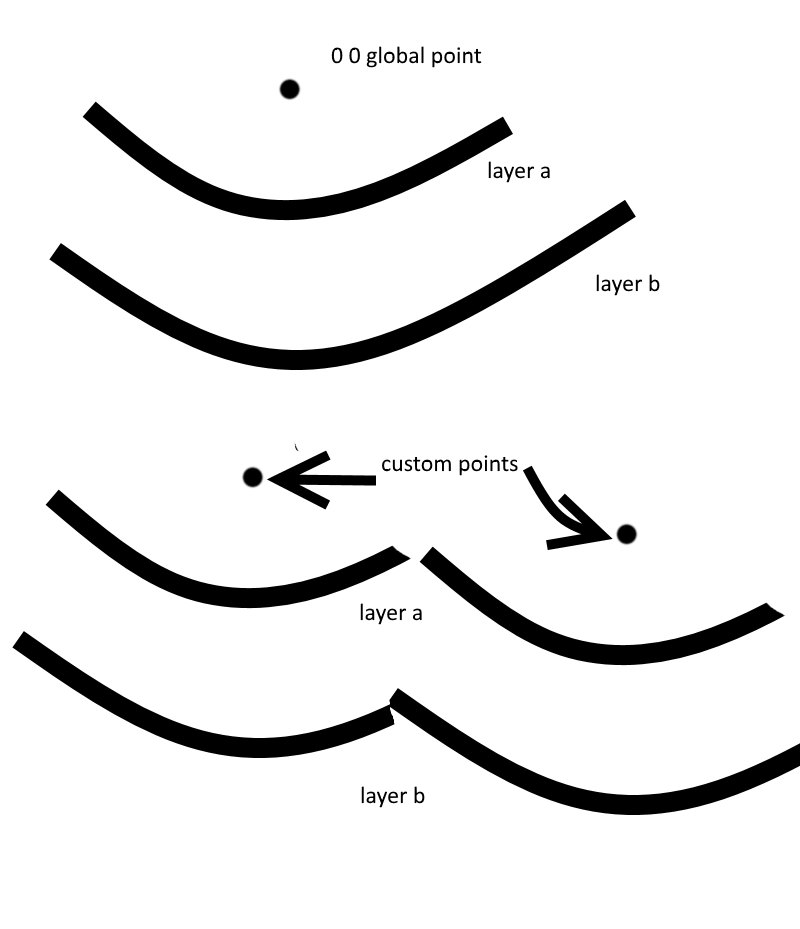
i strongly hope that you understand me 
Gio June 29th, 2017 I think I understand, yes... but I'm not sure that layers are the way to go for what you want to do.
If you wanted this to happen with respect to only one fixed point in space, then it would be easy: in your example, the star layer's transform is 0.1 and the planet layer's transform is 0.2. Then you would just set the star position at (planet_position * 2) and it would work. You could take zoom into account in that calculation too, and it wouldn't be too difficult.
However if you need more than one reference point, then you'll need some different way of doing this, i.e. actually move the planets when the camera moves. I don't think it's logically possible to do it with layers.
Unless I misunderstood what you mean :)

